
Screaming Frog has been the default technical SEO crawler for years, and honestly, it still deserves that reputation. If you need a deep one-time crawl, custom extraction, regex filtering, or advanced technical analysis, it’s one of the best SEO crawler tools available.
But SEO teams in 2026 are dealing with different problems than they were a few years ago.
Most teams no longer want to run manual crawls every few months and hope nothing breaks in between. They want continuous monitoring, automated alerts, cloud access, and tools that multiple people can use without passing around crawl files. Agencies want client-friendly reports. In-house teams want integrations with GA4 and Google Search Console. And smaller businesses often want a screaming frog alternative free enough to handle occasional audits without paying for another desktop license.
That’s why the market for cloud-based website crawler platforms has grown so quickly.
The important thing is this: the “best” Screaming Frog replacement depends entirely on what gap you’re trying to fill. Some tools focus on continuous monitoring. Others focus on enterprise scalability. Some prioritize visual reporting for clients. And a few simply make more sense if you already pay for a broader SEO suite like Ahrefs or Semrush.
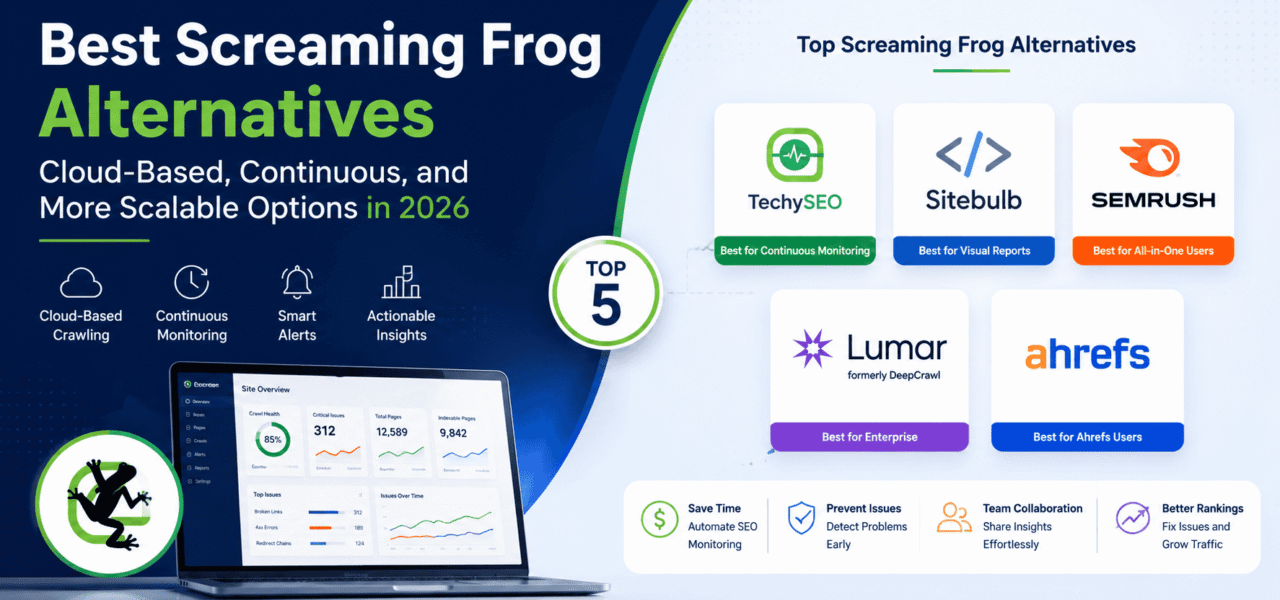
Here’s a realistic breakdown of the best Screaming Frog alternatives in 2026 and where each one actually fits.
Why People Look for Screaming Frog Alternatives
Before looking at alternatives, it’s worth understanding why so many SEO professionals eventually start exploring other options.
1. No Continuous Monitoring
Screaming Frog is fundamentally a manual crawler. You run a crawl, export the data, analyze issues, and repeat the process later.
That workflow still works for audits, but it creates a blind spot between crawls. If pages suddenly go offline next week or internal links break tomorrow, you won’t know unless you manually rerun another crawl.
For teams managing large sites that change daily, this becomes a real limitation.
2. Desktop-Only Workflow
Screaming Frog still relies heavily on local machine resources. Large crawls can consume a lot of RAM and CPU power, especially on ecommerce or enterprise websites.
It also creates collaboration problems. Sharing crawl data across distributed SEO teams isn’t always smooth, especially for agencies working with multiple clients.
This is one of the biggest reasons cloud-based website crawler platforms are becoming more popular.
3. No Uptime Monitoring
Technical SEO problems aren’t always crawl-related. Sometimes pages simply stop responding.
Screaming Frog can identify broken pages during a crawl, but it doesn’t continuously monitor uptime or alert teams when important pages suddenly return errors.
For ecommerce sites or lead-generation businesses, delayed detection can become expensive fast.
4. Free Version Limits
The free version is limited to 500 URLs.
That’s enough for testing or very small sites, but not enough for serious SEO work. Most professional users end up needing the paid license fairly quickly.
5. Team Costs Add Up
Screaming Frog’s pricing is reasonable for individual SEOs, but agencies often need multiple licenses.
At scale, teams sometimes prefer centralized cloud systems instead of managing multiple desktop installations.
6. It Was Built for Audits — Not Operational SEO
This is probably the biggest distinction.
Screaming Frog excels at investigation. It’s extremely powerful when you need to diagnose a technical issue deeply.
But many SEO teams now operate more like ongoing website operations teams. They need scheduled crawls, automated alerts, recurring monitoring, integrations, and historical issue tracking.
That’s where alternatives start making more sense.
Alternative 1 — TechySEO (Best for Continuous Monitoring)
TechySEO approaches technical SEO differently from Screaming Frog.
Instead of focusing primarily on one-time investigations, it’s built around continuous SEO monitoring.
That changes the workflow significantly.
Rather than manually remembering to run crawls every month or quarter, the platform runs scheduled crawls automatically and surfaces new issues as they appear. For teams managing active websites with constant deployments and content updates, this can dramatically reduce the time between issue creation and issue detection.
One of the biggest advantages is that it’s fully cloud-based. There’s no desktop installation, no local resource limitations, and no need to keep a machine running during large crawls.
The platform also includes continuous crawling, which helps teams monitor technical changes over time instead of relying entirely on snapshots from isolated audits.
Another major difference is uptime monitoring.
Most SEO crawlers can detect broken pages during audits, but TechySEO actively monitors whether important pages are actually responding properly. That means teams can receive alerts when critical pages fail instead of discovering the issue weeks later during the next crawl cycle.
The Google Search Console and GA4 integrations also make prioritization easier. Instead of treating every issue equally, teams can connect technical problems to actual traffic and search performance data.
That matters because not every SEO issue deserves immediate attention.
Some broken pages impact revenue. Others don’t matter much at all.
TechySEO tries to surface those differences automatically.
That said, Screaming Frog still has advantages in highly advanced technical investigations.
If you regularly use custom extraction, XPath configurations, advanced regex filtering, or highly specialized crawl setups, Screaming Frog remains incredibly powerful. Many experienced technical SEOs still prefer it for deep forensic analysis.
The distinction is really this:
- Screaming Frog is investigation-first
- TechySEO is monitoring-first
For many teams, those are two different needs entirely.
Best For
Teams that want proactive monitoring, automated alerts, and continuous visibility into technical SEO issues.
Especially useful for:
- In-house SEO teams
- SaaS companies
- Ecommerce sites
- Agencies managing multiple active websites
Alternative 2 — Sitebulb (Best Visual Reports)
The screaming frog vs sitebulb comparison comes up constantly, and for good reason.
Sitebulb targets a very similar audience but approaches usability differently.
Where Screaming Frog feels highly technical and data-heavy, Sitebulb focuses more on visualization and presentation.
Its reporting interface is much easier for non-technical stakeholders to understand. That makes it particularly appealing for agencies presenting audits to clients or internal SEO teams communicating with executives.
The crawl visualizations are also excellent. Site structures, internal linking patterns, and issue prioritization tend to be easier to interpret visually compared to raw spreadsheet exports.
Another advantage is Sitebulb Cloud, which gives users cloud-based crawling capabilities without relying entirely on desktop infrastructure.
Audit comparison is another strong feature. Teams can compare crawl changes between time periods more intuitively than in Screaming Frog.
Still, Sitebulb has limitations.
It’s generally more expensive for teams, especially if multiple users need access. And despite cloud capabilities, it still leans more toward periodic audits than true continuous monitoring.
Like Screaming Frog, it also doesn’t specialize in uptime monitoring.
Best For
Agencies and consultants that need polished, client-friendly technical SEO reports and easier stakeholder communication.
Alternative 3 — Semrush Site Audit (Best for All-in-One Users)
Semrush Site Audit makes the most sense if you already live inside the Semrush ecosystem.
As a standalone crawler, it’s probably not as powerful as Screaming Frog. But that’s not really its purpose.
The biggest advantage is convenience.
Because it’s integrated directly into the broader Semrush platform, teams can connect technical SEO data with rankings, keyword tracking, backlinks, and competitor research in one place.
It’s fully cloud-based, supports scheduled crawls, and removes the need for desktop installations entirely.
For many marketing teams, simplicity matters more than advanced crawl customization.
If your team already pays for Semrush, adding another dedicated crawler sometimes feels unnecessary.
That said, there are tradeoffs.
The technical depth still isn’t at the same level as dedicated crawling tools. Advanced technical SEOs may find the issue analysis less flexible than Screaming Frog.
Pricing can also become a concern. Access requires a Semrush subscription, and lower-tier plans include crawl limitations.
So while it’s convenient, it’s not always the cheapest Screaming Frog replacement.
Best For
Existing Semrush users who want integrated technical SEO reporting without adopting another standalone platform.
Alternative 4 — Lumar (Formerly DeepCrawl) (Best for Enterprise)
Lumar sits firmly in the enterprise category.
This is the kind of platform built for massive websites, international ecommerce operations, and enterprise SEO teams managing millions of URLs.
Unlike desktop crawlers, Lumar is designed for scale from the beginning.
Its cloud infrastructure handles extremely large crawls efficiently, including advanced JavaScript rendering and segmentation capabilities.
Large organizations also tend to value API access heavily, and Lumar supports custom integrations for internal reporting systems and workflows.
Another strength is enterprise governance.
Large companies often need user permissions, centralized reporting, stakeholder dashboards, and workflow integrations that desktop tools simply don’t prioritize.
The downside is obvious though: pricing.
Lumar is expensive compared to most alternatives. For small or medium businesses, it’s often unnecessary overkill.
And while it supports scheduled crawling and monitoring features, it still leans more toward enterprise auditing infrastructure than real-time operational monitoring.
Best For
Large enterprise SEO teams managing highly complex websites with millions of pages and advanced technical requirements.
Alternative 5 — Ahrefs Site Audit
Ahrefs Site Audit follows a similar philosophy to Semrush.
The crawler itself is solid, but the main value comes from integration with the broader Ahrefs ecosystem.
For teams already using Ahrefs heavily for backlinks, keyword research, and competitor analysis, the built-in audit system becomes convenient.
The platform is cloud-based and handles scheduled crawling reasonably well.
Issue reporting is straightforward, and Ahrefs does a good job surfacing common technical SEO problems clearly.
But Ahrefs still feels primarily like a backlinks and keyword platform first, with technical auditing as a secondary feature.
Monitoring frequency can also become limited on lower pricing tiers.
So while it works well for general SEO health tracking, technical SEO specialists may still prefer dedicated crawlers for deeper analysis.
Best For
SEO teams already invested in Ahrefs that want consolidated site health monitoring alongside backlink and keyword data.
Comparison Table
| Tool | Cloud-Based | Continuous Monitoring | Uptime Monitoring | Alerts | Pricing |
|---|---|---|---|---|---|
| Screaming Frog | No | No | No | No | £149/year |
| TechySEO | Yes | Yes | Yes | Yes | Free trial |
| Sitebulb | Partial | Limited | No | Limited | From £13.50/month |
| Semrush Site Audit | Yes | Partial | No | Yes | $119/month+ |
| Lumar | Yes | Partial | No | Yes | Enterprise pricing |
| Ahrefs Site Audit | Yes | Partial | No | Yes | $99/month+ |
Which Should You Choose?
The right choice depends less on “which tool is best” and more on the workflow you actually need.
Choose Screaming Frog If:
You need the deepest possible one-time technical crawl capabilities.
It’s still arguably the strongest desktop crawler for advanced technical investigations, custom extraction, regex filtering, and highly specialized audits.
Choose TechySEO If:
You want continuous monitoring instead of periodic audits.
This is especially important for active websites where technical issues can appear between manual crawl cycles.
If your team wants automated alerts, uptime monitoring, cloud access, and ongoing visibility, this is the strongest fit.
Choose Sitebulb If:
You regularly present SEO audits to clients or non-technical stakeholders.
The visual reports and UX are significantly easier to digest than traditional crawl exports.
Choose Semrush Site Audit If:
Your team already uses Semrush heavily.
The integrated workflow can outweigh the limitations of having a less specialized crawler.
Choose Lumar If:
You manage very large enterprise websites with millions of URLs and need enterprise-scale infrastructure.
Choose Ahrefs Site Audit If:
Your organization already relies on Ahrefs and wants technical SEO functionality bundled into the same platform.
Final Thoughts
Screaming Frog is still excellent at what it was built to do.
But the SEO industry has shifted toward continuous monitoring, automation, and collaborative workflows. For many teams, manually running occasional crawls is no longer enough.
That doesn’t mean Screaming Frog is obsolete. In fact, many experienced SEOs now use a hybrid approach:
- Continuous monitoring platform for ongoing visibility
- Screaming Frog for deep technical investigations when needed
For most in-house SEO teams, that combination actually makes a lot of sense.
If your current workflow depends entirely on quarterly manual crawls, moving to continuous monitoring can fundamentally change how quickly you catch — and fix — technical SEO issues.
Try TechySEO free — cloud-based, continuous SEO monitoring that alerts you when issues appear, not weeks later. No desktop installation required. Start your free trial at https://techyseo.com
