


Redirect chains are one of those technical SEO problems that quietly grow in the background. Most websites accumulate them over time without anyone noticing — especially after migrations, CMS updates, URL structure changes, or HTTPS implementations.
At first glance, a redirect chain might not seem harmful. The page still loads eventually, so everything appears fine from a user perspective. But search engines see something different: wasted crawl resources, slower response times, diluted ranking signals, and unnecessary complexity in site architecture.
The problem gets worse on large sites. A simple 2-hop redirect can multiply into thousands of inefficient requests across a website. Over time, those extra hops affect crawling efficiency, indexation speed, and even Core Web Vitals.
In this guide, you’ll learn exactly what redirect chains are, how they affect SEO technically, how to detect them properly, and the fastest ways to fix and prevent them in the future.
What Is a Redirect Chain?
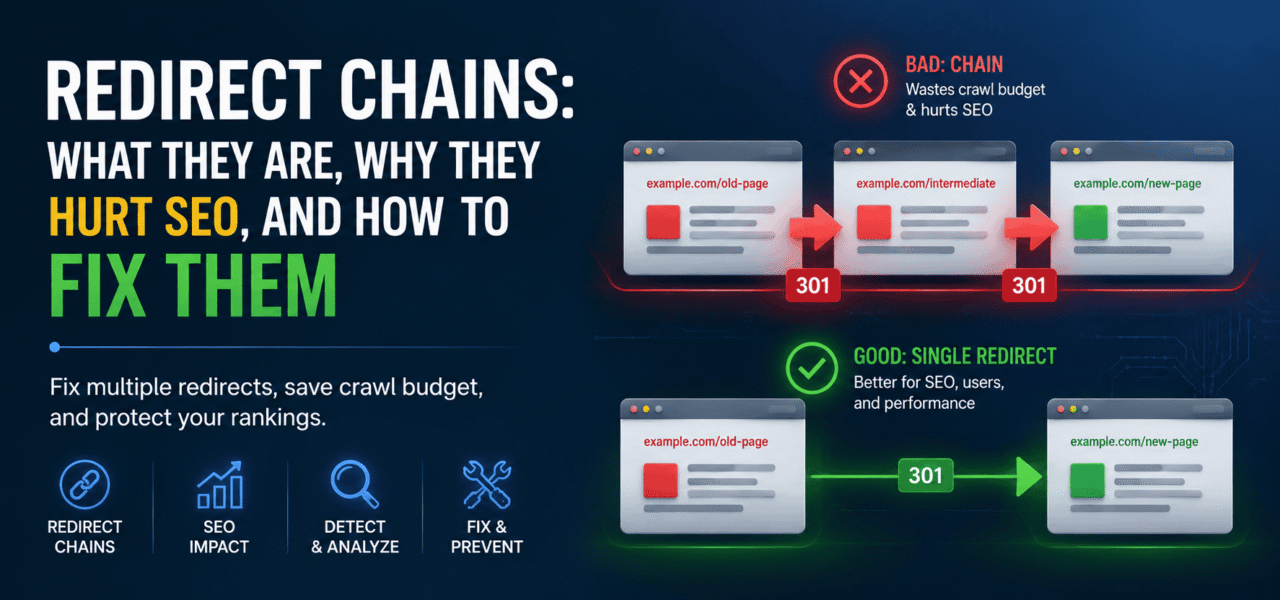
A redirect chain happens when one URL redirects to another URL, which then redirects again before reaching the final destination.
Example:
URL A → URL B → URL C
Instead of going directly to the final page, both users and crawlers must pass through multiple redirect hops.
Here’s the difference between a clean redirect and a redirect chain:
GOOD:
A → C

BAD:
A → B → C
Even though the destination resolves successfully, every extra hop adds latency and increases crawling complexity.
Redirect Chain vs. Redirect Loop
People often confuse redirect chains with redirect loops, but they’re different problems.
A redirect chain eventually resolves:
A → B → C
A redirect loop never resolves because it cycles endlessly:
A → B → A
Loops are more severe because browsers and crawlers eventually stop following them altogether. Users usually see browser errors like:
ERR_TOO_MANY_REDIRECTS
Chains are less catastrophic, but they still create major SEO inefficiencies when left unresolved.
A Real-World Example
This is one of the most common scenarios:
- A blog post originally lives at:
example.com/blog/seo-guide
- The slug changes later:
example.com/blog/technical-seo-guide
- Months later, the site migrates domains:
newdomain.com/blog/technical-seo-guide
Now the redirects look like this:
example.com/blog/seo-guide
→ example.com/blog/technical-seo-guide
→ newdomain.com/blog/technical-seo-guide
Nobody intentionally created a chain. It simply accumulated over time.
That’s exactly how most redirect chain SEO issues happen.
How Redirect Chains Hurt SEO
Redirect chains affect much more than loading speed. They directly impact crawling, indexation, and ranking signals.
Google has publicly stated they can follow up to 5 redirect hops, but that does not mean long chains are acceptable. Best practice is always a single redirect hop whenever possible.
Even 2-hop chains are worth fixing on websites where link equity and crawl efficiency matter.
PageRank and Link Equity Loss
Every redirect introduces signal processing overhead.
Historically, SEOs believed redirects caused direct PageRank loss. Google later clarified that modern 301 redirects pass nearly all equity. However, chains still create signal degradation because crawlers must process multiple hops before assigning canonical value.
The longer the chain, the more opportunities exist for:
- crawl interruptions
- timeout issues
- canonical confusion
- inconsistent indexing
- redirect parsing failures
Example:
Page A → Page B → Page C
If dozens of backlinks point to Page A, Google must repeatedly crawl intermediate redirects before consolidating signals into Page C.
That extra complexity slows down equity consolidation.
Crawl Budget Waste
This becomes a serious issue on large sites.
Every redirect hop consumes additional crawl resources.
Instead of:
1 request = 1 URL
Googlebot now processes:
3 requests = 1 destination
Multiply that across tens of thousands of URLs and crawl inefficiency grows quickly.
This especially affects:
- ecommerce websites
- news sites
- enterprise platforms
- low-authority domains with limited crawl allocation
If Googlebot spends too much time processing redirects, it may crawl fewer important pages overall.
Slower Page Load Times
Every redirect hop introduces additional latency.
Each step may require:
- DNS lookup
- TCP handshake
- SSL negotiation
- server processing
- additional TTFB
Even small delays compound.
Example:
HTTP → HTTPS → WWW → Final URL
That’s already multiple server requests before content begins loading.
Redirect chains frequently hurt:
- Largest Contentful Paint (LCP)
- Time to First Byte (TTFB)
- overall Core Web Vitals
Mobile users on slower connections feel these delays even more.
Indexation Delays
Long redirect chains slow down indexing.
Google may delay processing the final destination URL because it must first crawl and validate all intermediate hops.
In some cases, Google may even temporarily index an intermediate redirect URL instead of the final page.
This creates:
- duplicate indexing issues
- inconsistent canonicalization
- stale URLs appearing in SERPs
The longer the redirect path, the greater the indexing instability.
Redirect Hop Impact Table
| Number of Hops | Estimated Link Equity Retained | Crawl Impact |
|---|---|---|
| 1 Hop | Very High | Minimal |
| 2 Hops | Slight degradation | Moderate |
| 3 Hops | Noticeable inefficiency | Significant |
| 4+ Hops | High risk of crawl waste | Severe |
Common Causes of Redirect Chains
Most redirect chains are accidental.
They typically appear after years of website updates, migrations, and layered server configurations.
Multiple Website Migrations
This is the biggest cause.
Example:
domain1.com
→ domain2.com
→ domain3.com
If old redirects are never updated directly to the newest destination, chains accumulate permanently.
CMS Auto-Generated Redirects
Many CMS platforms automatically create redirects when slugs change.
WordPress plugins are notorious for this.
Example:
/seo-basics
→ /seo-guide
→ /technical-seo-guide
Editors rarely revisit older redirects after changing URLs again later.
CDN or Proxy Redirect Layers
Cloudflare, reverse proxies, load balancers, and CDNs sometimes add redirects on top of existing server rules.
A common example:
HTTP → HTTPS at CDN
HTTPS → WWW at server
Now a clean redirect became a chain.
HTTP to HTTPS + WWW to Non-WWW
This is probably the most common accidental 2-hop chain on the internet.
Example:
http://example.com
→ https://example.com
→ https://www.example.com
Instead, this should happen in a single hop:
http://example.com
→ https://www.example.com
Old Redirect Rules Never Updated
Developers often add new redirects without auditing existing rules.
Over time:
A → B
B → C
C → D
Nobody consolidates them.
The chain quietly grows.
How to Find Redirect Chains
Redirect chains are mostly invisible during normal browsing.
You click a URL and the page loads eventually.
That’s why automated detection matters.
Using a Crawler
Crawlers are the most reliable way to detect redirect chain SEO issues at scale.
Tools like Screaming Frog can identify:
- redirect chains
- loops
- orphaned redirects
- internal links pointing to redirected URLs
Inside Screaming Frog:
Response Codes → Redirection (3xx) → Redirect Chains
You can also use TechySEO’s redirect chain analysis feature to automatically identify redirect hops across an entire site.
The biggest advantage of automated crawlers is visibility at scale. Manual checks simply do not catch enterprise-level redirect problems reliably.
Using curl
You can manually trace redirects with curl.
Example command:
curl -I -L https://example.com
Flags explained:
-Ifetches headers only-Lfollows redirects automatically
The output shows every redirect hop sequentially.
This is useful for debugging individual URLs quickly.
Using Browser DevTools
Chrome DevTools can also reveal redirect behavior.
Steps:
- Open DevTools
- Go to the Network tab
- Reload the page
- Filter requests by redirect status codes
You’ll see each redirect request separately along with timing data.
This helps identify performance bottlenecks caused by multiple redirects.
Checking Internal Links
Internal linking is an overlooked source of redirect chains.
Many websites internally link to URLs that already redirect.
Example:
Internal link → URL A
URL A → URL B
That means crawlers repeatedly hit unnecessary redirects during site traversal.
Always update internal links to point directly to the final canonical destination.
This is one of the fastest ways to reduce crawl waste.
How to Fix Redirect Chains (Step-by-Step)
Fixing redirect chains usually involves simplifying redirect paths so every URL resolves in one hop.
Update the Original Redirect
This is the cleanest fix.
Instead of:
A → B → C
Update the original redirect:
A → C
Now the intermediate redirect becomes unnecessary.
This reduces crawl overhead immediately.
Update Internal Links
After fixing redirects, update all internal references.
That includes:
- navigation links
- XML sitemaps
- breadcrumbs
- contextual links
- canonical tags
Internal links should never point to redirected URLs.
Direct linking improves crawl efficiency significantly.
Update Inbound Backlinks
External backlinks often continue pointing to outdated redirected URLs.
You can identify them using:
- Google Search Console
- Ahrefs
- Majestic
- Semrush
Where possible, ask referring sites to update their links directly to the final destination.
This removes redirect dependency entirely.
Fix HTTP to HTTPS + WWW Stacking
Instead of layering redirects separately, combine them into one server-level rule.
Apache .htaccess Example
RewriteEngine On

RewriteCond %{HTTPS} off [OR]
RewriteCond %{HTTP_HOST} !^www\.example\.com$ [NC]

RewriteRule ^(.*)$ https://www.example.com/$1 [L,R=301]
This handles:
- HTTP → HTTPS
- non-WWW → WWW
in a single redirect hop.
Nginx Example
server {
    listen 80;
    server_name example.com www.example.com;

    return 301 https://www.example.com$request_uri;
}
Again, one redirect instead of multiple stacked redirects.
Redirect Loop Fix
Loops require identifying the circular redirect rule.
Example:
A → B
B → A
To fix:
- Identify conflicting rules
- Remove one redirect
- Verify the destination resolves normally
- Retest with curl or a crawler
Always validate changes after deployment.
A small server rule mistake can create sitewide redirect failures instantly.
Preventing Redirect Chains in the Future
Preventing chains is easier than cleaning them up later.
The key is maintaining redirect governance.
Maintain a Redirect Map
Keep a document tracking:
Old URL → Final Destination
Never redirect to another redirected URL intentionally.
Always redirect directly to the canonical endpoint.
Audit Existing Redirects Before URL Changes
Before creating new redirects:
- check existing rules
- inspect historical migrations
- validate canonical targets
This prevents accidental chain stacking.
Use Automated Monitoring
Redirect problems often reappear after:
- CMS updates
- plugin installations
- CDN configuration changes
- deployment releases
Using automated monitoring helps catch issues early.
TechySEO’s continuous crawling system can detect new redirect chains automatically before they spread across the site.
Audit After Every Migration
Every migration introduces redirect risk.
Always perform a redirect audit after:
- HTTPS migrations
- domain changes
- URL restructures
- CMS replacements
This is where most multiple redirects SEO issues originate.
Conclusion
Redirect chains are one of the most common technical SEO problems because they accumulate silently over time. A site may function normally while crawlers waste resources processing unnecessary hops behind the scenes.
Even short chains affect crawl efficiency, indexation speed, and performance. On larger websites, those inefficiencies scale quickly.
The best solution is simple: every URL should redirect directly to the final destination in one hop whenever possible.
Regular audits, redirect mapping, and automated monitoring are the most effective ways to prevent chains from growing unnoticed.
TechySEO automatically detects redirect chains across your entire site — every crawl, not just when you remember to check. Get alerted before chains accumulate and compound. Start your free trial → https://techyseo.com
